
Yes, AI can meaningfully boost your productivity — but only when three conditions hold: the task fits what AI actually does well, a human reviews the output, and your workflow is redesigned to use the time saved. Survey evidence puts average time savings at about 5.% of work hours for AI users, roughly 2.2 hours per week for a full-time worker. That's real, but it doesn't happen automatically.
The three conditions that determine whether you see real gains:
- Task fit: AI reliably accelerates bounded, well-defined tasks (drafting, summarizing, formatting) — not open-ended judgment calls.
- Human review: Every AI output needs a person to verify accuracy, catch errors, and take responsibility for the result.
- Workflow redesign: Saved time only converts to output when you deliberately redirect it toward higher-value work.
Thinksmarterai is built around exactly this human-in-the-loop principle: AI as a thinking partner, not a replacement for your judgment.
Table of Contents
- What "AI for productivity" actually means — and where it stops
- Practical workflows for individuals, parents, and educators
- How to write prompts that actually work
- What can go wrong — and how to prevent it
- A 30-day starter plan for safe AI habits
- Data privacy and security when using AI productivity tools
- Ethical use of AI in productive work
- How to measure whether AI is actually helping you
- How AI tools fit into the software you already use
- Key AI productivity tools and what they're actually good for
- Key Takeaways
- Why the "just use AI" advice misses the point
- Thinksmarterai: structured resources for responsible AI use
- Useful sources and further reading
What "AI for productivity" actually means — and where it stops
"AI for productivity" means using artificial intelligence tools to accelerate the bounded, repeatable parts of knowledge work: drafting a first version, summarizing a long document, organizing a task list, or generating a rubric. Think of it as a task accelerant and knowledge amplifier, not an autonomous worker.
The distinction between inner-loop and outer-loop work matters here. Inner-loop tasks are the ones AI handles well: writing a first draft, pulling key points from a transcript, formatting data. Outer-loop tasks — reviewing that draft for accuracy, integrating it with other work, making the final call — still belong to you. As economist Ernie Tedeschi explains, AI often speeds up inner-loop work significantly, but human bottlenecks in review and integration are the real constraint on whether that speed translates into more finished output.
"Time savings don't automatically convert to output unless workers have autonomy and incentives to use that time productively." — Ernie Tedeschi, Stripe Economics
Stanford economist Erik Brynjolfsson describes generative AI as a force multiplier that raises the performance floor, particularly for less-experienced workers. A newer employee using AI-assisted suggestions can close the gap with a seasoned colleague faster than ever before. That's the upside. The limit is that no AI tool eliminates the need for human judgment on what the output is actually for.
Pro Tip: The moment AI saves you 20 minutes on a draft, block that 20 minutes for something that requires your actual thinking — a hard conversation, a creative decision, a concept you've been avoiding. That's how the math works in your favor.
Practical workflows for individuals, parents, and educators
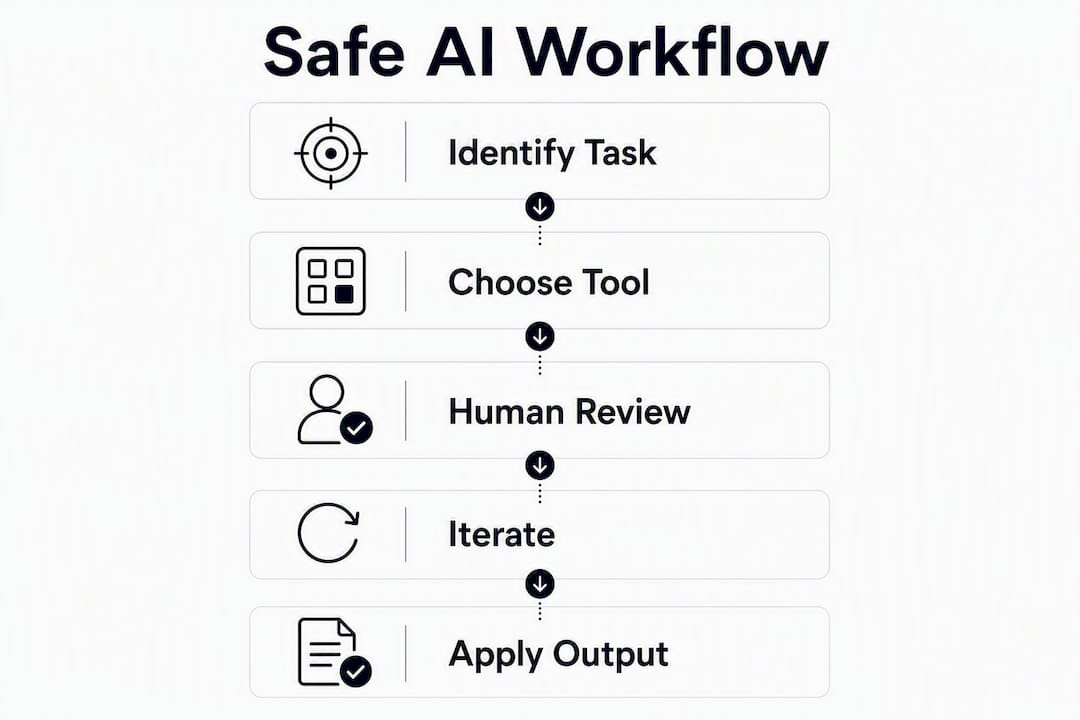
The fastest way to see results is to start with tasks you already do repeatedly and find tedious.
For individuals:
- Email triage: paste your inbox summary into a chatbot and ask it to flag urgent items and draft brief replies for your review.
- Research summarization: upload or paste a long article and ask for a five-bullet summary with the key claim and one counterargument.
- Draft-first editing: write a rough outline, ask AI to expand it into a first draft, then rewrite it in your own voice.
Keep human-supervised: final send decisions on emails, factual claims in any document, and anything that goes to another person under your name.
For parents:
- Use AI to generate comprehension questions after your child reads a chapter — then ask your child to answer them without looking back. AI creates the prompt; your child does the thinking.
- Ask a chatbot to explain a concept three different ways so you can find the version that clicks for your child's learning style.
- Never let a child submit AI-generated text as their own work. The value is in the conversation around the output, not the output itself.
For educators:
- Generate a first-draft grading rubric for an assignment, then adjust it to match your actual learning objectives.
- Use AI to create differentiated versions of a reading passage at two or three Lexile levels.
- Draft a lesson plan outline and fill in the pedagogical decisions yourself.
Human supervision in every case: developmental appropriateness, privacy (never enter student names or identifying details into a public AI tool), and final instructional judgment stay with the teacher.
How to write prompts that actually work
The single most useful rule: put your constraints in the first sentence. Tell the AI what format you want, what to avoid, and what the output is for — before you describe the task.
A reliable prompt structure looks like this: "Write a [format] about [topic] for [audience]. Keep it under [length]. Avoid [specific thing]. Cite sources if you use any."
"AI often reduces task time by a large share on many document compilation and summarization tasks." — Anthropic research on estimating AI productivity gains
That range is real for well-scoped tasks. The catch is that poorly scoped prompts produce outputs that take longer to fix than to write from scratch.
Verification checklist after every AI output:
- Hallucination check: Did it cite a source? Look it up. AI confidently invents citations.
- Factual accuracy: Cross-check any statistic, date, or name against a primary source.
- Tone and voice: Does it sound like you, or like a generic template? Rewrite the parts that don't.
- Misinterpretation: Did it answer the question you asked, or a slightly different one? Re-read your prompt.
- Privacy: Did you accidentally include personal data in the prompt? If so, don't use that session for sensitive work.
What can go wrong — and how to prevent it
AI tools carry four categories of risk that parents and educators need to understand concretely.
- Hallucinations: AI generates plausible-sounding but false information, including fake citations. Mitigation: verify every factual claim against a primary source before acting on it.
- Bias: Models reflect the data they were trained on, which includes human biases. Mitigation: read outputs critically, especially on topics involving people, history, or social issues.
- Privacy and data leakage: Text you enter into a public AI tool may be used to improve the model. Mitigation: never enter student names, addresses, health information, or any data covered by FERPA or COPPA into a consumer AI product without checking the tool's data policy.
- Over-reliance and de-skilling: Using AI for tasks that build important skills — writing, reasoning, problem-solving — can erode those skills over time, especially in younger users. Mitigation: use AI to check or extend thinking, not to replace the thinking itself.
Red flags to watch for: an AI answer that sounds very confident but can't be verified, a citation that doesn't exist when you search for it, or a tool that asks for more personal information than the task requires.
One U.S.-specific note: schools and districts are subject to FERPA and, for younger students, COPPA — always follow your school or district's data-use policy before using any AI tool with student information.
A 30-day starter plan for safe AI habits
| Week | Focus | Daily time | Example activities |
|---|---|---|---|
| — | Setup and orientation | — | Choose one tool, read its privacy policy, try one low-stakes prompt |
| 2 | Low-risk experiments | — | Summarize an article, draft an email, generate a rubric |
| — | Verification routines | — | Fact-check every output, log what AI got wrong, refine prompts |
| — | Reflection and redesign | 20 min | Review your log, identify which tasks saved real time, decide what to keep |
Keep a simple log: date, task, time saved (estimate), one thing AI got wrong. After four weeks, you'll have real data on whether this is working for your specific situation. Research indicates that time savings only convert to output when workers actively redirect that time — your log is the tool that makes that redirection intentional.
Data privacy and security when using AI productivity tools
The privacy risk with AI productivity tools is specific: the text you enter is the data. Unlike a spreadsheet that stays on your device, a prompt sent to a cloud-based AI tool travels to a server, may be logged, and in some products may be used for model training.
Practical rules: read the data retention policy of any tool before you use it for work. Microsoft 365 Copilot, for example, states that prompts and responses are not used to train its underlying models and that it inherits your organization's existing permissions and sensitivity labels. ChatGPT's enterprise tier offers similar protections, but the free consumer version has different defaults. For anything involving student data, the tool must be compliant with FERPA and, where applicable, COPPA — and your district's IT department should approve it first.
Minimize what you share: use generic descriptions instead of real names, anonymize examples, and never paste raw student records into any AI interface.
Ethical use of AI in productive work
The core ethical question isn't whether to use AI — it's whether the person submitting the output takes responsibility for it. AI-generated content presented as your own original work without disclosure is a form of misrepresentation in most academic and professional contexts. That line matters especially in education.
For educators, the practical standard is: if a student couldn't explain how they arrived at the answer, the AI did the work, not the student. For professionals, the standard is similar: if you can't stand behind every claim in an AI-assisted document, it isn't ready to send.
Responsible use also means acknowledging AI's limits on contested topics. AI reflects training data, which means it can reproduce stereotypes, oversimplify complex issues, and present one perspective as consensus. Critical reading of AI output — the same skill you'd apply to any source — is non-negotiable.
How to measure whether AI is actually helping you
Measuring productivity gains from AI requires a baseline. Before you start, track how long a recurring task takes without AI assistance. After two to four weeks of using AI for that task, measure again. The difference is your real gain — not a self-reported estimate.
Consultants in one Stanford GSB study completed 12% more tasks and spent 25% less time per task with AI assistance. Customer service agents in the same research were noticeably more productive overall, with the largest gains for the least-experienced workers. Those numbers come from controlled field studies, not self-reports — which tend to overestimate gains.
Track three things: time per task, error rate (how often you had to correct AI output), and output quality (did the final product meet your standard?). If time drops but error rate rises, you're not ahead.
How AI tools fit into the software you already use
Most people don't need a new app. The AI tools with the fastest adoption curves are the ones embedded in software you already open every day.
Microsoft 365 Copilot sits inside Word, Excel, Outlook, and Teams, so drafting, summarizing, and data analysis happen in the same window where the work lives. ChatGPT connects to Google Drive, SharePoint, Slack, and Microsoft Teams through plugins, letting it pull context from existing files and channels. Google's Gemini Spark integrates natively with Gmail, Calendar, Docs, Sheets, and Slides, and can run scheduled tasks in the background.
The integration principle: start with the tool that touches the task you do most often. If you live in email, start with an AI email assistant. If you build documents, start with an AI writing layer in your word processor. Switching to a standalone AI tool and then copying outputs back into your workflow adds friction and reduces the chance you'll stick with it.
Key AI productivity tools and what they're actually good for
Different tools are built for different jobs. Here's where each category genuinely earns its place:
Conversational AI (ChatGPT, Gemini): Best for drafting, brainstorming, summarizing, and answering research questions. Weakest on real-time data and verified citations — always check.

Integrated workplace assistants (Microsoft 365 Copilot): Best for users already in the Microsoft ecosystem who want AI inside familiar apps. Copilot can summarize a meeting in Teams, draft a reply in Outlook, and analyze a spreadsheet in Excel without leaving the app.
Autonomous agents (Gemini Spark, ChatGPT Work): Best for multi-step, recurring tasks you'd otherwise do manually on a schedule. Gemini Spark can scan your inbox every Monday, summarize the week's key updates, and block calendar time for deep work. ChatGPT Work can turn a discovery conversation into a project brief within hours. Both require careful setup of what the agent is allowed to do and when it should pause for your approval.
Scheduling and task management AI: Tools like Motion and Reclaim.ai analyze your calendar and task list to automatically schedule deep work blocks and protect focus time. These are low-risk starting points because the stakes of an error are low.
Content and document generators: AI writing assistants embedded in tools like Notion AI or Google Docs help with first drafts and editing. The output always needs a human pass for accuracy and voice.
The honest summary: no single tool does everything well. Pick the one that fits your most time-consuming task, use it for four weeks with a verification routine, and evaluate before adding another.
Key Takeaways
Responsible AI use for productivity means keeping human judgment in the loop at every step — not just at the end.
| Point | Details |
|---|---|
| Start with inner-loop tasks | Draft, summarize, and format first; keep review and final decisions human. |
| Verify every output | Check facts, citations, and tone before any AI-assisted work leaves your hands. |
| Redesign the workflow | Saved time only becomes real gain when you redirect it to higher-value work deliberately. |
| Protect student data | Never enter student names or records into a consumer AI tool without district approval and FERPA compliance. |
| Use Thinksmarterai resources | The human-in-the-loop approach at Thinksmarterai gives parents and educators structured guides, checklists, and age-appropriate activities to start safely. |
Why the "just use AI" advice misses the point
The loudest voices on AI productivity tend to skip the part where things go wrong. A student submits an AI-written essay and can't explain a single sentence in it. A professional sends a report with a fabricated statistic because they trusted the output without checking. A parent installs an AI homework helper and watches their child's writing skills stall.
None of that means AI is the problem. It means the workflow was wrong. The research is consistent: gains are real for bounded tasks, and they're largest for people who are still building their skills — which is exactly why the stakes are highest for younger users. A tool that closes the gap between a novice and an expert can also close the gap between a student who is learning and one who is just getting answers.
The question worth asking isn't "how do I use AI faster?" It's "what am I keeping for myself?" The tasks that build your judgment, your voice, and your expertise are the ones to protect. Use AI on everything else, verify rigorously, and keep the time you save for the work that actually requires you.
Thinksmarterai: structured resources for responsible AI use
Most AI guides hand you a tool list and leave you to figure out the rest. Thinksmarterai takes a different approach: structured educational resources built specifically for people who want to use AI thoughtfully, not just quickly.
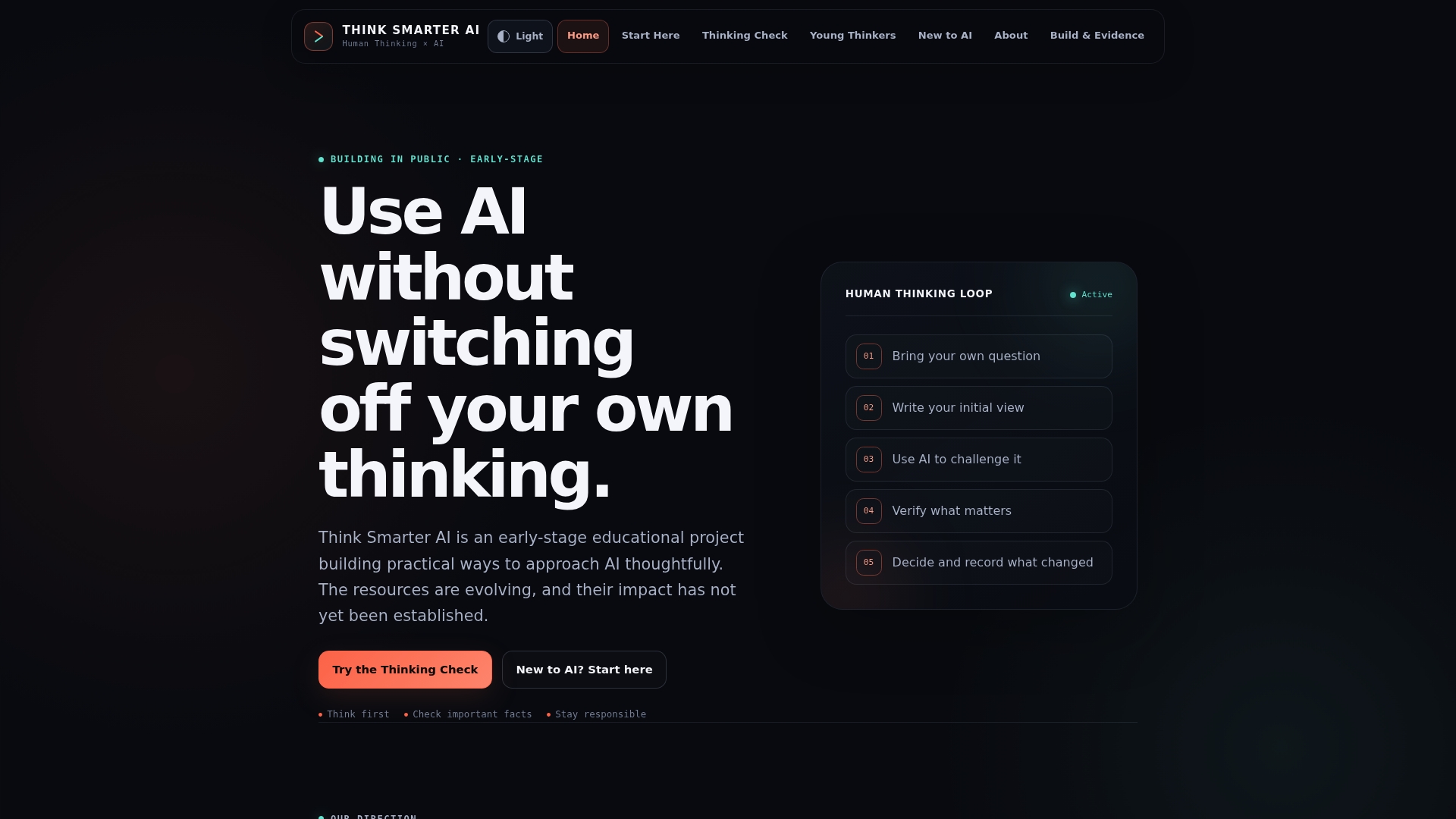
The New to AI beginner guide walks first-time users through their first prompts with safety checks built in — no prior experience needed. The Young Thinkers Roadmap gives parents and educators age-appropriate activities that teach critical thinking alongside AI use, so kids learn to evaluate outputs rather than just accept them. The Thinking Check tool is a practical checklist that helps anyone evaluate AI output and keep their own reasoning central to the process.
For schools and districts exploring AI adoption, Thinksmarterai offers workshop resources and guided frameworks designed around human judgment first. Start with the beginner guide or the Young Thinkers Roadmap — both are free and ready to use today.
Useful sources and further reading
| Source | Why it's relevant |
|---|---|
| Ernie Tedeschi, Stripe Economics | Economic analysis of inner-loop vs. outer-loop productivity limits; essential for realistic expectations |
| Stanford GSB — Brynjolfsson research | Field study on AI-assisted customer service agents; strongest real-world productivity data available |
| St. Louis Fed — Generative AI and work productivity | Survey-based time-savings estimates across occupations; useful for setting realistic expectations |
| Anthropic — Estimating AI productivity gains | Task-level analysis of time reductions and macro-level adoption projections |
These sources represent practical experiments and economic analyses, not vendor marketing. Consult them for technical depth and follow Thinksmarterai for educational frameworks built around responsible use.
This article is general educational information, not professional legal, medical, or financial advice. Verify current school district policies and applicable regulations with the appropriate authority for your specific situation.